π—π€πˆ π—π€ππˆ

π»π‘œπ‘™π‘œπ‘”π‘Ÿπ‘Žπ‘β„Žπ‘–π‘ Β· 𝑆𝑒𝑏-π‘–π‘›π‘“π‘œπ‘Ÿπ‘šπ‘Žπ‘‘π‘–π‘œπ‘› πΆπ‘œπ‘›π‘π‘’π‘π‘‘ 𝐷𝑒𝑠𝑖𝑔𝑛

Don't have an account?Sign up·User Manual

Activation code and API key will be sent to this email. (May be delayed or filtered as spam.)

Verification Code Sent!

Please click the activation link in your email to complete registration.

API Base URL:

The API Key will also be included in the activation email. Please keep it safe.

May be delayed or in spam.

Already have an account? Login now

Β© 2022-2026 XABC Labs

π—π€πˆ π—π€ππˆ

Unlicensed
Sub-account tools are disabled for this account. To manage sub-accounts, please use a pay-as-you-go account with a balance greater than the sub-account threshold, or contact an admin.

Today's real-time usage statistics

You can query data within 3 years

Total Cost

\$0.00

Total Requests

0

Total Tokens

0

Images

0

Input Tokens

0

Output Tokens

0

Cache Tokens

0

Model Cost Distribution

Model Request Distribution

Model Usage Details

Model Requests Input Tokens Output Tokens Cache Tokens Images Cost Percentage

Daily Usage Statistics

Date Requests Cost Tokens Images Primary Model

Account Balance Query

Supported format: XAI API Keys starting with sk-Xvs...

Query Results

🌐 Supported AI Service Providers

OpenAI

platform.openai.com/docs

Anthropic

docs.anthropic.com

Perplexity

docs.perplexity.ai

Mistral AI

docs.mistral.ai

Grok AI

docs.x.ai

Gemini

ai.google.dev

Cohere

docs.cohere.com

DeepSeek

api-docs.deepseek.com

AI21

docs.ai21.com

✨ The XAI platform fully supports all models from the above AI service providers. With a single API key, you can seamlessly access AI models from any of these providers, enabling flexible and efficient AI application development.

🧭 How It Works

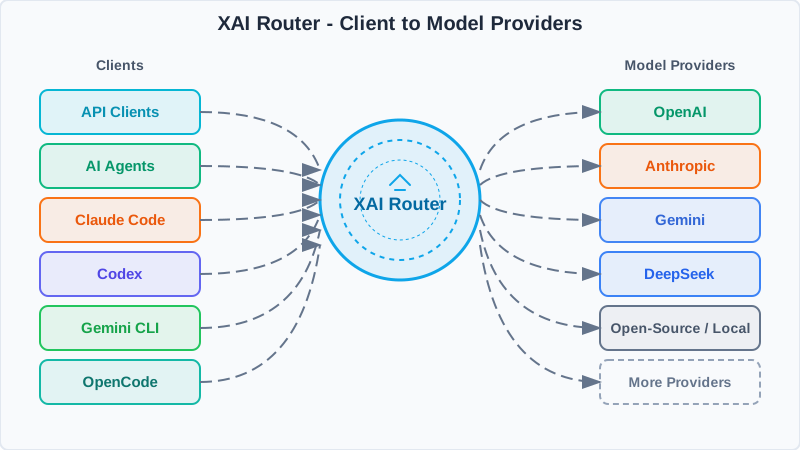
One entrypoint handles auth, routing, and normalization before reaching model providers.

XAI Router
XAI Router architecture diagram
XAI Router sits between clients and providers to apply policies, map models, and return consistent responses.
1

Single entrypoint

Use one XAI API key and a unified base_url.

2

Smart routing

Policies, model mapping, rate limits, and observability live in the router.

3

Provider fan-out

Requests go to OpenAI, Claude, Gemini, and more, then normalize on the way back.

πŸ’» SDK Examples

OpenAI SDK Example

import os
from openai import OpenAI

XAI_API_KEY = os.getenv("XAI_API_KEY")
client = OpenAI(
    api_key=XAI_API_KEY,
    base_url="",
)

completion = client.chat.completions.create(
    model="gpt-5",
    messages=[
	{"role": "system", "content": "You are AI"},
	{"role": "user", "content": "What is the meaning of life, the universe, and everything?"},
    ],
)

print(completion.choices[0].message)

Anthropic SDK Example

import os
from anthropic import Anthropic

XAI_API_KEY = os.getenv("XAI_API_KEY")
client = Anthropic(
    api_key=XAI_API_KEY,
    base_url="",
)
message = client.messages.create(
    model="claude-sonnet-4-5-20250929",
    max_tokens=128,
    system="You are AI.",
    messages=[
	{
	    "role": "user",
	    "content": "What is the meaning of life, the universe, and everything?",
	},
    ],
)
print(message.content)

πŸ§ͺ cURL Examples

OpenAI /chat/completions

curl /chat/completions \
  -H "Content-Type: application/json" \
  -H "Authorization: Bearer $XAI_API_KEY" \
  -d '{
    "model": "gpt-5.2",
    "messages": [
      {
        "role": "developer",
        "content": "You are a helpful assistant."
      },
      {
        "role": "user",
        "content": "Hello!"
      }
    ]
  }'

Anthropic /messages

curl /v1/messages \
  -H 'Content-Type: application/json' \
  -H 'anthropic-version: 2023-06-01' \
  -H "X-Api-Key: $XAI_API_KEY" \
  -d '{
    "max_tokens": 1024,
    "messages": [
      {
        "content": "Hello, world",
        "role": "user"
      }
    ],
    "model": "claude-sonnet-4-5-20250929"
  }'

Create New Sub-account

Username must be unique and cannot duplicate existing accounts
Email address must be unique and cannot duplicate existing accounts

API Call Examples

cURL

Python

JavaScript

Fund/Deduct Sub-account

Support query by username or user ID

API Call Examples

cURL

Python

JavaScript

Top Up Your Account

Use WeChat to add credits to this account. Once the payment is confirmed, the balance will update automatically

Monthly Quickly enable target models
Loading subscription plans...

WeChat Pay

The generated QR code will be displayed here

Scan with WeChat to Pay

Pay-as-you-go alternative to monthly plans; minimum 10 CNY

Current Order

Order
Amount
Credit Granted
Status
Awaiting Payment

Customer Support

Need help with a recharge, invoice, or issue? Scan to add WeChat support and mention β€œXAI”.

  • Hours: Weekdays 10:00 - 19:00 (Beijing time)
  • Have your order number or account email ready for faster assistance

The support QR code will appear here

Support WeChat QR code

Recharge History

No recharge records

Configuration Guide

Unified setup notes for Codex CLI / Codex App / Claude Code / OpenCode / OpenClaw.

Codex CLI / App Claude Code OpenCode OpenClaw

Unified prerequisite: use gateway (OpenAI uses ); and configure XAI_API_KEY.

Codex CLI / Codex App

Codex supports two wire protocols: responses and chat. Choose based on model capability. Once ~/.codex/config.toml and XAI_API_KEY are configured, Codex App can reuse the same gateway setup. On Windows, the config path is %USERPROFILE%\.codex\config.toml.

Option A: wire_api = "responses" (recommended for Codex models)

# ~/.codex/config.toml
model_provider = "xai"
model = "gpt-5.3-codex"
approval_policy = "never"
sandbox_mode = "danger-full-access"
network_access = true
preferred_auth_method = "apikey"

[model_providers.xai]
name = "xai"
base_url = ""
wire_api = "responses"
requires_openai_auth = false
env_key = "XAI_API_KEY"

# launch
export XAI_API_KEY="sk-Xvs..."
codex --yolo

Option B: wire_api = "chat" (for OpenAI Chat-shape models)

# ~/.codex/config.toml
[model_providers.xai]
name = "xai"
base_url = ""
env_key = "XAI_API_KEY"
wire_api = "chat"
requires_openai_auth = false

[profiles.minimax]
model = "MiniMax-M2.5"
model_provider = "xai"

# launch
export XAI_API_KEY="sk-Xvs..."
codex --profile minimax

Windows CMD (launch and verify)

:: Config file path
:: %USERPROFILE%\.codex\config.toml

:: Set API key
set XAI_API_KEY=sk-Xvs...

:: Option A (responses)
codex

:: Option B (chat)
codex --profile minimax

Windows PowerShell (launch and verify)

# Config file path
# $env:USERPROFILE\.codex\config.toml

$env:XAI_API_KEY="sk-Xvs..."

# Option A (responses)
codex

# Option B (chat)
codex --profile minimax

Verify with: codex (responses) or codex --profile minimax (chat)

Claude Code (MiniMax-M2.5)

Claude Code integration is primarily environment-variable based. The following example sets MiniMax-M2.5 as the default model family via .

Environment variables (Linux / macOS)

export XAI_API_KEY="sk-Xvs..."
export ANTHROPIC_AUTH_TOKEN="$XAI_API_KEY"
export ANTHROPIC_BASE_URL=""
# Optional: custom default model mapping for Claude families (not required)
export ANTHROPIC_DEFAULT_OPUS_MODEL="MiniMax-M2.5"
export ANTHROPIC_DEFAULT_SONNET_MODEL="MiniMax-M2.5"
export ANTHROPIC_DEFAULT_HAIKU_MODEL="MiniMax-M2.5"

# launch Claude Code
claude

Environment variables (Windows CMD)

set XAI_API_KEY=sk-Xvs...
set ANTHROPIC_AUTH_TOKEN=%XAI_API_KEY%
set ANTHROPIC_BASE_URL=
:: Optional: custom default model mapping for Claude families (not required)
set ANTHROPIC_DEFAULT_OPUS_MODEL=MiniMax-M2.5
set ANTHROPIC_DEFAULT_SONNET_MODEL=MiniMax-M2.5
set ANTHROPIC_DEFAULT_HAIKU_MODEL=MiniMax-M2.5

claude

Environment variables (Windows PowerShell)

$env:XAI_API_KEY="sk-Xvs..."
$env:ANTHROPIC_AUTH_TOKEN=$env:XAI_API_KEY
$env:ANTHROPIC_BASE_URL=""
# Optional: custom default model mapping for Claude families (not required)
$env:ANTHROPIC_DEFAULT_OPUS_MODEL="MiniMax-M2.5"
$env:ANTHROPIC_DEFAULT_SONNET_MODEL="MiniMax-M2.5"
$env:ANTHROPIC_DEFAULT_HAIKU_MODEL="MiniMax-M2.5"

claude

Verify with: claude

OpenCode (MiniMax-M2.5)

OpenCode connects through the OpenAI API endpoint. Put core setup in ~/.config/opencode/opencode.json (on Windows, you can use %USERPROFILE%\.config\opencode\opencode.json), and set XAI_API_KEY. OpenAI API has two request formats: Chat Completions (/v1/chat/completions) and Responses (/v1/responses).

Core config (OpenCode + MiniMax-M2.5)

{
  "$schema": "https://opencode.ai/config.json",
  "provider": {
    "XAI": {
      "options": {
        "baseURL": "",
        "apiKey": "{env:XAI_API_KEY}"
      },
      "models": {
        "MiniMax-M2.5": {}
      }
    }
  }
}

OpenAI API format 1: Chat Completions (messages)

curl /chat/completions \
  -H "Authorization: Bearer ${XAI_API_KEY}" \
  -H "Content-Type: application/json" \
  -d '{
    "model":"MiniMax-M2.5",
    "messages":[{"role":"user","content":"Explain the purpose of a microservice gateway in one sentence"}]
  }'

OpenAI API format 2: Responses (input)

curl /responses \
  -H "Authorization: Bearer ${XAI_API_KEY}" \
  -H "Content-Type: application/json" \
  -d '{
    "model":"gpt-5.3-codex",
    "input":"Explain the purpose of a microservice gateway in one sentence"
  }'

Windows CMD (env and config path)

set XAI_API_KEY=sk-Xvs...
mkdir "%USERPROFILE%\.config\opencode" 2>nul
notepad "%USERPROFILE%\.config\opencode\opencode.json"

opencode debug config

Windows PowerShell (env and config path)

$env:XAI_API_KEY="sk-Xvs..."
New-Item -ItemType Directory -Path "$env:USERPROFILE\.config\opencode" -Force | Out-Null
notepad "$env:USERPROFILE\.config\opencode\opencode.json"

opencode debug config

Verify with: opencode debug config

OpenClaw

OpenClaw can connect to OpenAI API and Claude API, and can also be extended to OpenAI Responses API. XAI Router supports OpenAI API and Claude API by default; for Responses mode, set api = "openai-responses". Config path: ~/.openclaw/openclaw.json on Linux / macOS, and %USERPROFILE%\.openclaw\openclaw.json on Windows.

Mode 1: OpenAI Chat API compatible (api = "openai-completions")

{
  "agents": {
    "defaults": {
      "model": { "primary": "xairouter/MiniMax-M2.5" }
    }
  },
  "models": {
    "mode": "merge",
    "providers": {
      "xairouter": {
        "baseUrl": "",
        "apiKey": "${XAI_API_KEY}",
        "api": "openai-completions",
        "models": [{ "id": "MiniMax-M2.5", "name": "MiniMax-M2.5" }]
      }
    }
  }
}

Mode 2: Claude API compatible (api = "anthropic-messages")

{
  "agents": {
    "defaults": {
      "model": { "primary": "xairouter/MiniMax-M2.5" }
    }
  },
  "models": {
    "mode": "merge",
    "providers": {
      "xairouter": {
        "baseUrl": "",
        "apiKey": "${XAI_API_KEY}",
        "api": "anthropic-messages",
        "models": [{ "id": "MiniMax-M2.5", "name": "MiniMax-M2.5" }]
      }
    }
  }
}

Mode 3: OpenAI Responses API compatible (api = "openai-responses")

{
  "agents": {
    "defaults": {
      "model": { "primary": "xairouter/gpt-5.3-codex" }
    }
  },
  "models": {
    "mode": "merge",
    "providers": {
      "xairouter": {
        "baseUrl": "",
        "apiKey": "${XAI_API_KEY}",
        "api": "openai-responses",
        "models": [{ "id": "gpt-5.3-codex", "name": "gpt-5.3-codex" }]
      }
    }
  }
}

Windows CMD (env and config path)

set XAI_API_KEY=sk-Xvs...
mkdir "%USERPROFILE%\.openclaw" 2>nul
notepad "%USERPROFILE%\.openclaw\openclaw.json"

openclaw models status

Windows PowerShell (env and config path)

$env:XAI_API_KEY="sk-Xvs..."
New-Item -ItemType Directory -Path "$env:USERPROFILE\.openclaw" -Force | Out-Null
notepad "$env:USERPROFILE\.openclaw\openclaw.json"

openclaw models status

Verify with: openclaw models status

View Sub-account Information

Leave empty to display all sub-account information

API Call Examples

cURL

Python

JavaScript

Update Sub-account Information

Enter the username or user ID of the sub-account to update

Basic Information

Quota Settings

Rate Limits

Model-Specific Limits

Quick fill
Supports JSON; you can also enter "*" to clear all, or "-gpt-5, -gpt-5-nano" to remove specific models. Each model can have rpm, rph, rpd, tpm, tph, tpd limits. Leave empty to keep current settings.

Access Control

Model mapping is incremental: "-key" removes, "*" clears.

API Call Examples

cURL

Python

JavaScript

Sub-account List

0 sub-accounts
Loading sub-accounts...

No sub-accounts yet

This account has no sub-accounts

Page 1 / 1 Β· Total 0

Delete Sub-account

This action cannot be undone. The sub-account Key will be immediately invalidated.

Please carefully confirm the sub-account identifier to delete

API Call Examples

cURL

Python

JavaScript

Sub-account Insights

to

Loading billing data...

Failed to load billing data

Please verify network access and API permissions, then retry

Total Cost

$0.00

Total Requests

0

Total Tokens

0

Total Images

0

Input Tokens

0

Output Tokens

0

Cache Tokens

0

Model Cost Distribution

Model Request Distribution

Cost Trend Analysis

Daily Trend

Model Spend & Requests

Summarize request share and cost structure to pinpoint primary cost drivers.

Model Requests Prompt Completion Spend Request Share Spend Share

Sub-account Overview

Compare sub-account request and spend distribution to flag anomalies quickly.

User Requests Input Tokens Output Tokens Cache Tokens Images Spend Spend Share

Daily Timeline

Review daily totals, model share, and cache hits across the selected range.

Activity Logs

Time Action Target Account Details IP Address

Loading logs...

No activity logs available

Operation Result


πŸ”‘ Secret Key

Please keep this key secure, it will be used for sub-account API authentication

πŸ’‘ Tip: Please notify the sub-account owner to check their email for the API key

Sub-account Editor

Sub-account

Basic Info

Usage Limits

Rate Limits

Models & Access

Model mapping is incremental: use "*" or "=" to clear, "-key" to remove.
Supports JSON; use "*" or "=" to reset, or "-gpt-5" to remove a model.

Other

Confirm Action